
Samurai Shift Log & Downtime Management
Stop losing critical maintenance context between crew rotations. Samurai replaces fragmented notebooks, radio tags, and messy spreadsheets with a connected, field-ready shift log.
<div style="display: flex; gap: 15px; align-items: center; justify-content: space-between; flex-wrap: wrap;">
<div style="flex: 1; min-width: 250px;">
</div>
<div>
<a href="tel:+61739150894" style="background-color: #f26522; color: #ffffff; padding: 12px 20px; text-decoration: none; border-radius: 4px; font-weight: 600; display: inline-block; white-space: nowrap;">Contact Us</a>
</div>
</div>

- 40 sitesASG Equipment runs on Samurai
- 30+ years on the toolsFounded by a mining maintenance leader
- Brisbane-based teamBuilt and supported in Australia
A Shift Log Built Around the Maintenance Actually Happening
Samurai Shift Log pulls the important shift information into one structured handover view. Supervisors can record crew details, safety updates, contractor attendance, photos, comments, downtime events and open tasks.
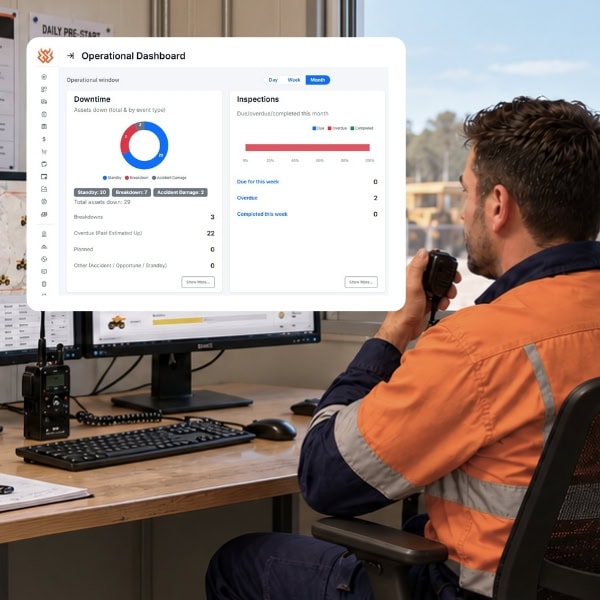
Events can be tracked by asset and status in real time. Comments stay attached to the event, so the story does not disappear between shifts. Technicians and supervisors can add updates from mobile, and live downtime dashboards show what is still in progress.
<div style="display: flex; gap: 15px; align-items: center; justify-content: space-between; flex-wrap: wrap;">
<div style="flex: 1; min-width: 250px;">
</div>
<div>
<a href="tel:+61739150894" style="background-color: #f26522; color: #ffffff; padding: 12px 20px; text-decoration: none; border-radius: 4px; font-weight: 600; display: inline-block; white-space: nowrap;">Contact Us</a>
</div>
</div>

Machine Status at Handover
See what’s running, what’s parked up in the bay, and what needs a look before the next crew takes over.
Real Downtime Tracking
Record breakdowns, delays, smoko lags, and standby time against the right asset as they happen.
Notes That Stick
Keep comments, photos, and updates attached to the actual event rather than buried in text messages or lost in the crib room.
Crew and Contractor Visibility
Keep tabs on who was on shift, who came to site, and what defects or jobs were handed over.
Field Mobile Updates
Supervisors and sparkies/fitters can drop updates straight from the machine while the details are fresh.
Instant Shift Reports
Wrap up the shift with a clean summary covering notes, safety, crew allocations, and downtime.
<div style="display: flex; gap: 15px; align-items: center; justify-content: space-between; flex-wrap: wrap;">
<div style="flex: 1; min-width: 250px;">
</div>
<div>
<a href="tel:+61739150894" style="background-color: #f26522; color: #ffffff; padding: 12px 20px; text-decoration: none; border-radius: 4px; font-weight: 600; display: inline-block; white-space: nowrap;">Contact Us</a>
</div>
</div>
At the end of shift, Samurai produces a clear report covering shift notes, safety information, crew details, tasks, downtime events and comment history.
Shift Handovers Built for Real Site Conditions
A shift log shouldn’t be another pointless admin chore tacked on at the end of a long shift. In Samurai, the shift log is built around what actually went down on site: machine status, plant availability, defects, tasks, safety callouts, and notes straight from the people closest to the gear.
The incoming crew gets the full picture straight away without having to chase people on the radio or piece together the story from memory.

Captured As It Happens
Breakdowns, delays, and open defects are logged against the asset as they occur, rather than being guessed at knock-off time. Every event holds its own history, including status updates and comments from the floor. Whether it’s a blown hose in the pit or a haul truck waiting on parts, the information is locked in so handovers reflect actual site activity.

Clear Ownership Between Crews
Open items, comments, and status updates roll straight into the next shift so nothing drops through the cracks. Supervisors can instantly see what’s still underway, what’s been handed over, and who owns the next step. Because notes stay linked to the work, the incoming team knows the context immediately.

Live Visibility Across the Operation
Supervisors and superintendents can view live progress, plant status, and shift activity in real time. Instead of relying on fragmented phone calls or second-hand radio updates, everyone has a single source of truth. That means fewer operational surprises, quicker troubleshooting, and better control while the shift is still running.
<div style="display: flex; gap: 15px; align-items: center; justify-content: space-between; flex-wrap: wrap;">
<div style="flex: 1; min-width: 250px;">
</div>
<div>
<a href="tel:+61739150894" style="background-color: #f26522; color: #ffffff; padding: 12px 20px; text-decoration: none; border-radius: 4px; font-weight: 600; display: inline-block; white-space: nowrap;">Contact Us</a>
</div>
</div>
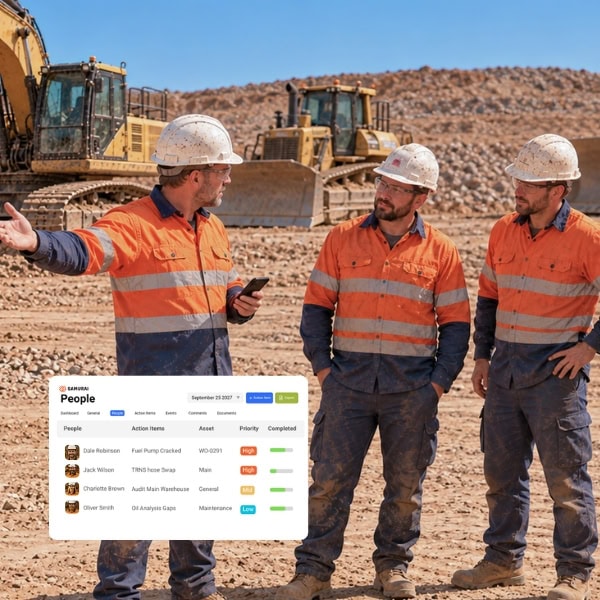
Why Maintenance Crews Use Samurai Shift Log
The Next Shift Starts Ready
Incoming supervisors check plant status, open events, and outstanding defect lists before they even hit the floor.
Field Context Stays Put
Photos, comments, and event details captured out on site stay together, giving management a reliable audit trail.
Less Guesswork, Less Blame
Stop piecing shifts together from phone logs, scraps of paper, and faulty memory. The record is already there.
<div style="display: flex; gap: 15px; align-items: center; justify-content: space-between; flex-wrap: wrap;">
<div style="flex: 1; min-width: 250px;">
</div>
<div>
<a href="tel:+61739150894" style="background-color: #f26522; color: #ffffff; padding: 12px 20px; text-decoration: none; border-radius: 4px; font-weight: 600; display: inline-block; white-space: nowrap;">Contact Us</a>
</div>
</div>
What Changes When Handover is Sorted
When shift data is captured properly, operations stop starting from scratch.
- Plant and machine status is crystal clear
- Open defects carry across crew changes
- Downtime events are logged accurately
- Management gets a true view of site productivity
- Crews spend more time turning wrenches and less on paperwork
See how Samurai Shift Log works on a real fleet
<div style="display: flex; gap: 15px; align-items: center; justify-content: space-between; flex-wrap: wrap;">
<div style="flex: 1; min-width: 250px;">
</div>
<div>
<a href="tel:+61739150894" style="background-color: #f26522; color: #ffffff; padding: 12px 20px; text-decoration: none; border-radius: 4px; font-weight: 600; display: inline-block; white-space: nowrap;">Contact Us</a>
</div>
</div>
Stop managing maintenance. Start managing your assets.
See how Samurai gives earthmoving contractors and plant hire companies complete control over the machines that generate their revenue.
Starter
Best for small teams with fewer than 20 assets
- Starter Includes
- Asset register
- Preventative maintenance schedules
- Meter readings and usage
- Work requests
- Work orders
- Purchase orders
- Forms and inspections
- Task templates
- Maintenance history
- Reporting and dashboards
- Mobile app for Apple or Android
Business
Best for medium to large operations
- Everything in Starter plus
- Asset specifications
- Contractor work assignment
- Component management
- Events and downtime
- Measurements
- Timesheets
- Life cycle costing
- Basic budgeting
- Telemetry integrations
- Priority support
- Bundled onboarding
- User defined dashboard
Enterprise
Best for large, multi-site operations
- Everything in Business plus
- Unlimited-user pricing options
- Single sign-on
- Advanced integrations
- Custom workflows and configuration
- Hierarchical approvals
- API Access
- Dedicated account management
- Enterprise onboarding
- Custom reporting requirements
- MCP and AI Integrations
Plans and pricing
Straightforward pricing. Serious fleet control.
Starter
Best for small teams with fewer than 20 assets
$49per user/month
Book a demoBusiness
Best for medium to large operations
$125per user/month
Book a demoEnterprise
Best for large, multi-site operations
Custompricing
Let's talk14-day trial. No credit card required. Billed monthly. Compare all features
Frequently asked questions
What is a Shift Log in a fleet management system?
A Shift Log is a structured record of what happened during a shift, including machine status, downtime events, defects, safety notes, crew details and outstanding work.
How does Samurai improve shift handovers?
Samurai keeps handover information in one place. Supervisors can record events, comments, photos and open actions so the next shift starts with the facts.
Can Shift Log events be linked to assets?
Yes. Events can be tracked against assets and status in real time, giving teams a clearer view of machine availability and downtime.
Can crews update the Shift Log from mobile?
Yes. Supervisors and technicians can add comments and updates from the Samurai mobile app.
Does Samurai create shift reports?
Yes. Samurai can produce an end-of-shift report covering shift notes, safety information, crew details, tasks, downtime events and comment history, which matches the Shift Log feature set in your deck.
Reports are wrapped as a PDF on shift completion, saved and emailed.
My site already uses a fleet management system like MineStar or Jigsaw. Can I still use Samurai for maintenance?
Yes. Samurai sits alongside your existing fleet management or dispatch system and focuses on maintenance control.
It can integrate with dispatch systems to bring in real event data, such as delays, downtime and machine activity. That data is then used by maintenance to track issues properly, link events to assets, and build a clear picture of what is actually happening on site.
You don’t need to replace your current system. Samurai works with it to give you better maintenance visibility and control.