
CMMS For Earthmoving Fleets
An Inventory System that works For You
Samurai is inventory management software built for earthmoving fleets. It connects parts, stock, and purchasing directly to maintenance work, so you always know what’s available, what’s allocated, and what needs to be ordered.
An inventory management system Tied to Your CMMS
Samurai handles inventory as part of your maintenance workflow, not as a standalone system.
Parts, stock, and purchasing sit inside the same platform as your work orders, assets, and maintenance tasks. That means:
- Parts are tracked as they are used
- Stock levels update automatically
- Purchasing is driven by actual demand
- No double handling or separate systems
This is inventory management built for maintenance teams, not adapted from retail or warehouse software.
You’re not managing inventory in isolation. You’re controlling the parts that keep your fleet running.
Inventory management built for maintenance
Track parts, stock, and purchasing inside your CMMS.
Warehouse and location control
Track stock across multiple sites with full visibility of where items are stored.
Work order driven reservations
Review stock levels and allocate parts to jobs in the work orders before they start so work isn’t delayed.
Automatic back orders and purchasing
Generate demand directly from work and trigger purchase orders without manual tracking.
Stock level control with min/max rules
Set clear stock levels to prevent shortages and reduce overstocking.
Rotable and component tracking
Track serialised components through fitment, removal, repair, and reuse.
INVENTORY MANAGEMENT BUILT FOR EARTHMOVING FLEETS
Inventory shouldn’t slow the job down. In earthmoving fleets, parts don’t sit neatly on shelves. Stock moves across sites, jobs compete for the same items, and critical parts are needed without notice. Basic inventory systems quickly turn into stockouts, over-ordering, or crews chasing parts.
Samurai handles parts and inventory the way maintenance actually runs. Stock is tracked, reserved, and replenished automatically, so you’re not constantly fixing it.
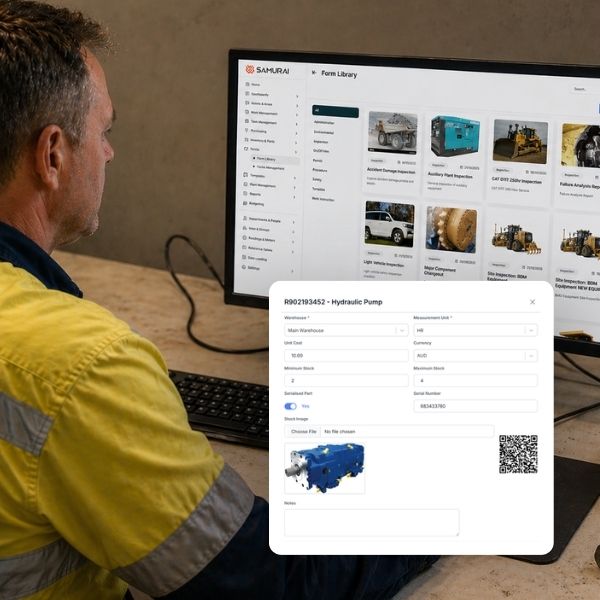
PARTS THAT SUPPORT EVERY JOB
Every job starts with the right parts.
Parts are structured in a central catalogue with clear suppliers, interchangeability, and stock links. When a job is planned, required parts are already defined and ready to allocate.
Instead of guessing what’s needed, your team is working from a setup that’s already been thought through properly.
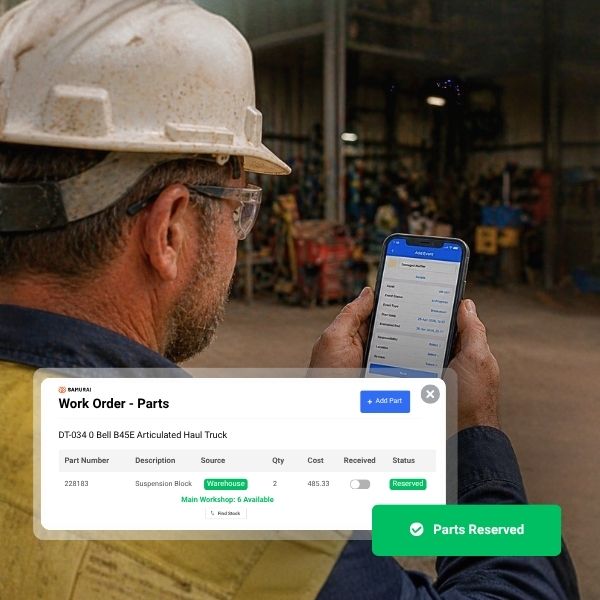
ALLOCATE STOCK BEFORE WORK STARTS
When parts are needed, they’re already accounted for.
Stock is reserved against work orders before the job begins. Crews know what’s available, what’s allocated, and what’s still required.
That means less chasing, fewer delays, and work starting with the right parts in place.
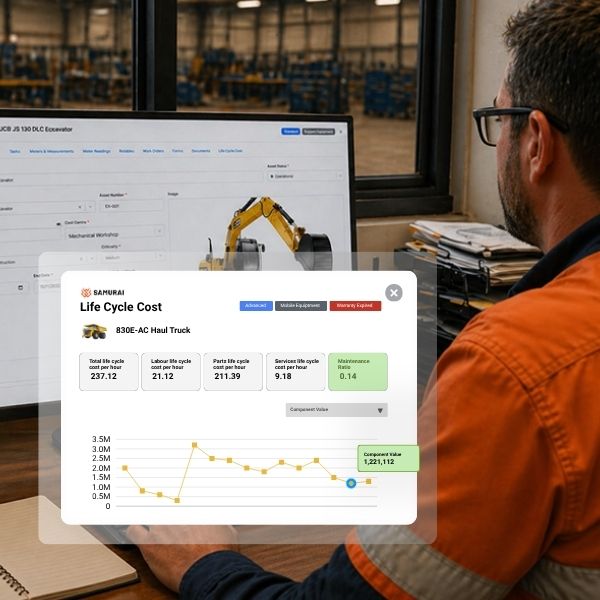
ACCURATE STOCK AND COST VISIBILITY
Because every movement is tracked, your numbers hold up.
Parts issued, returned, transferred, and scrapped are all recorded against work and stock. You’re not relying on adjustments or assumptions to understand what’s happening.
Over time, you get a clear view of parts usage, stock trends, and the real cost of keeping your fleet running.
WHAT CHANGES WHEN YOUR INVENTORY MANAGEMENT SYSTEM ACTUALLY WORKS FOR YOU?
When inventory matches how your maintenance actually runs, everything starts to fall into place.
Stock levels stay under control
Crews stop chasing parts
Less capital tied up in slow-moving parts
Obsolete stock is reduced
Purchasing is driven by real usage
Crews stop chasing parts
Frequently asked questions
Does Samurai track parts across multiple warehouses and sites?
Yes. Stock is tracked by warehouse and location, so you can see exactly what’s on hand, where it is, and what’s available across your entire operation. Transfers between locations are recorded, so stock stays accurate as it moves.
Can parts be reserved for work orders?
Yes. Parts can be reserved against a work order before the job starts. This ensures the required items are allocated and not taken by another job, so crews aren’t delayed when work begins.
What happens if a part isn’t in stock?
If a part isn’t available, Samurai creates a back order directly from the work order. This can trigger purchasing, so the required parts are ordered without manual tracking or follow-up.
Does Samurai support min and max stock levels?
Yes. You can set minimum and maximum stock levels for each item. This helps you reorder parts before they run out, while avoiding overstocking and unnecessary spend.
Can Samurai track spare parts usage and history?
Yes. Every part issued, returned, transferred, or scrapped is recorded. You can see which work orders used specific parts and track usage over time, giving you a clear view of demand and cost.
How does Samurai handle rotables and serialised parts?
Rotables are tracked as individual components, not just quantities. Each item has its own serial number, status, repair condition, and full movement history, including fitment, removal, and repair.
Does Samurai integrate inventory with maintenance workflows?
Yes. Inventory is fully connected to work orders, tasks, and purchasing. Parts are allocated, consumed, and replenished as part of the job, so there’s no need for separate systems or double handling.
How quickly can inventory be set up?
Inventory can be set up quickly using existing parts lists, supplier data, or spreadsheets. You don’t need to build everything from scratch to start getting value.